
QuickAccess
A global menu giving you quick access to folders and custom commands.
George Florea Bănuș ✓ Verified
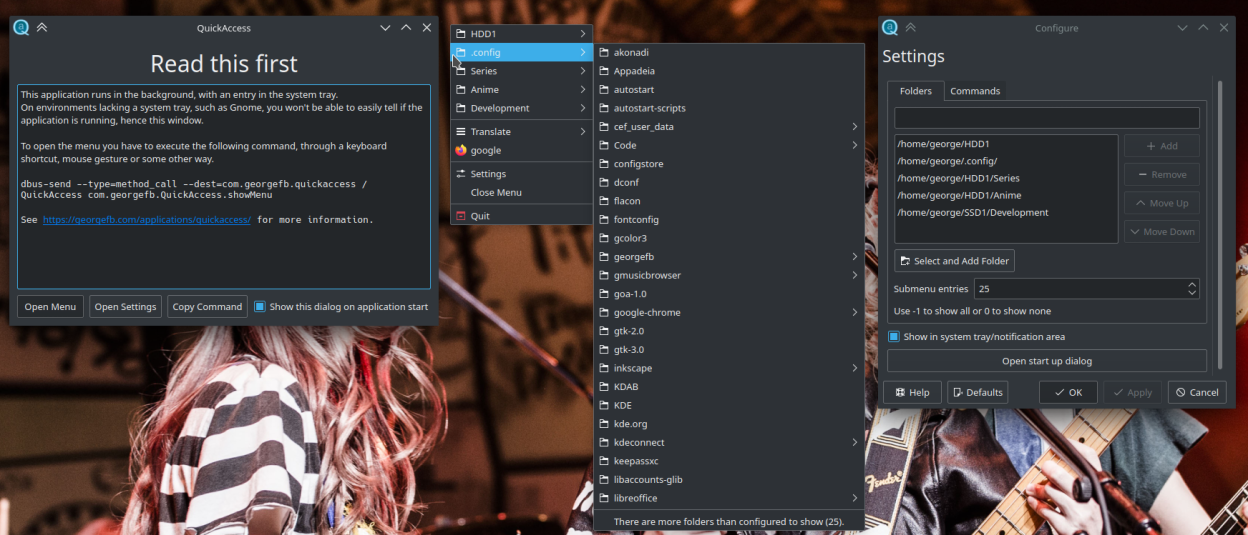
com.georgefb.quickaccessQuickAccess is a program running in the background providing a global menu to quickly access user defined folders and their subfolders as well as creating and running custom commands. The menu can be opened through two dbus methods: showMenu and showDelayedMenu. Both methods can open the menu in a predefined fixed position or on mouse position.
showMenu shows the menu instantly, but in certain circumstances there are problems with the menu not showing or not closing. In these cases use the showDelayedMenu, there is a default delay of 150 miliseconds, but can be changed (see example below).
Open menu with dbus-send
dbus-send --type=method_call --dest=com.georgefb.quickaccess /QuickAccess com.georgefb.QuickAccess.showMenu int32:x
dbus-send --type=method_call --dest=com.georgefb.quickaccess /QuickAccess com.georgefb.QuickAccess.showDelayedMenu int32:200 int32:x
Replace x with an int from 0 to 9 to set the preffered position to open the menu.
Check the project page for more info https://github.com/g-fb/quickaccess.
Screenshots
Observed history
| App | Change | Version | When ↑ |
|---|
No observed changes yet.
The initial import establishes a baseline. Future version changes will appear here.
Browse the app catalogue →Upstream releases
Release notes supplied by the developer. These dates are not Flathub package publication times.
3.2.024 Sept 2025
Features:
- Show folders and commands in the tray icon menu
3.1.024 Apr 2024
Ported to Qt6.
Features:
- Settings: added option to add folder from clipboard
- Settings: added option to insert menu separators
3.0.119 Jun 2022
Bugfixes:
- Improved hidpi support.
- Fixed loading of custom icons.
3.0.05 Mar 2022
The way settings are saved has changed, when launching the new version, the old settings will be converted to the new format. Before that a backup will be created, in the same folder as the existing config file. In case something goes wrong file a bug report.
Features:
- Reworked the settings window.
- Added option to show sections instead of separators in menu.
- Folders in settings can be rearranged with drag and drop.
- Added option to set custom icons for folders.