
RapidRAW
A non-destructive, and GPU-accelerated RAW image editor built with performance in mind
Timon Käch ✓ Verified
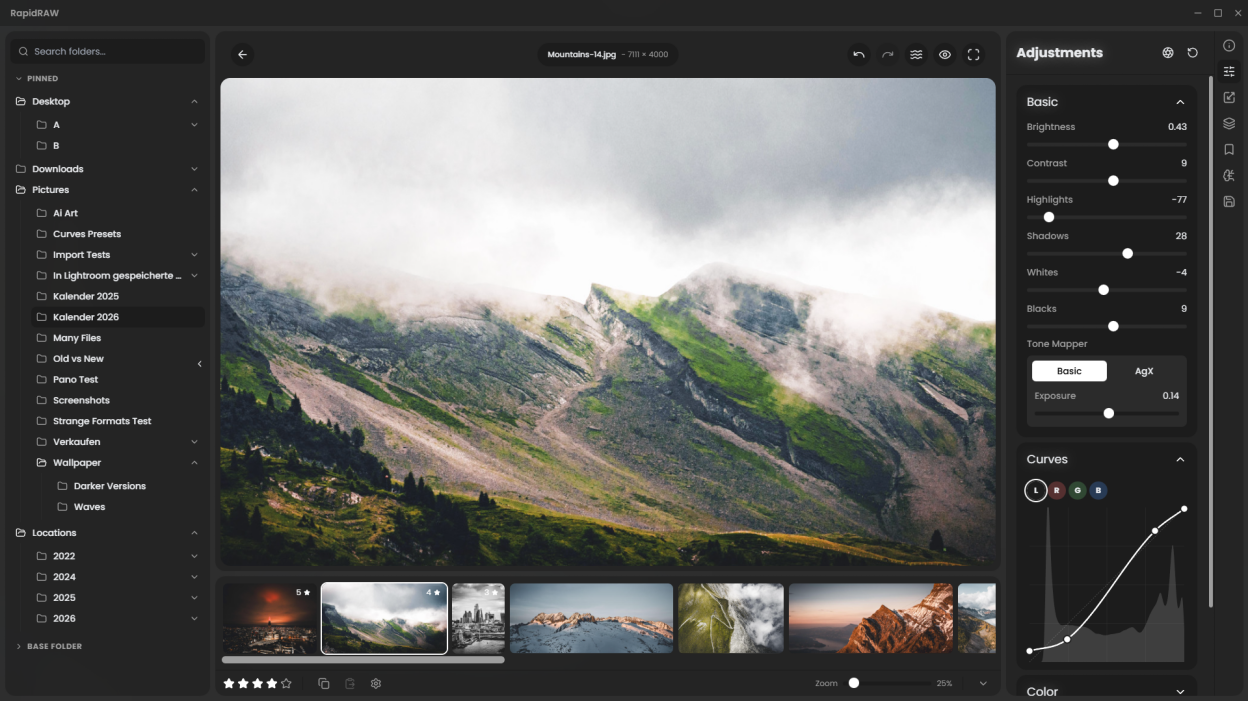
io.github.CyberTimon.RapidRAWRapidRAW is a modern, high-performance alternative to Adobe Lightroom®. It delivers a simple, beautiful editing experience in a lightweight package (under 20MB) for Windows, macOS, and Linux.
I started developing this project as a personal challenge when I was 18. My goal was to create a high-performance tool for my own photography workflow while deepening my understanding of React, WGSL and Rust, with the support from Google Gemini.
Screenshots
Observed history
| App | Change | Version | When ↓ |
|---|---|---|---|
| updated | v1.6.5 | 9 Oct 2026 |
Upstream releases
Release notes supplied by the developer. These dates are not Flathub package publication times.
v1.6.56 Oct 2026
New Features
- Kelvin White Balance & Area Sampling: Reads camera-recorded RAW white balance with Kelvin-accurate temperature adjustments, interactive area sampling, and live canvas preview cards.
- Guided Filter: Replaced standard blurs with an edge-aware filtering pipeline across clarity, structure, dehaze, shadows, and highlights to eliminate halos and preserve micro-textures.
- Rewritten Whites Slider: Applies smooth targeted curves that brighten the upper tonal range while reinjecting micro-textures to prevent blown-out, flat highlights.
- Pick & Reject Flags: Speed up culling workflows using dedicated shortcuts and badges, with automatic dimming and batch deletion options for rejected files.
- RapidRAW Cloud: Optional remote GPU generative cleanups without local hardware setup, processing brush patches securely without RAW files leaving the device.
- AI-Free Mode: Single-switch mode that hides all generative buttons, AI masks, and neural tools for a distraction-free, contest-compliant workspace.
- Reorderable Adjustment Panels: Fully modular sidebar allowing dragging, reordering, collapsing, and hiding of individual tools.
- Savable Aspect Ratios: Custom crop ratios can now be permanently saved as reusable presets.
Core Improvements
- Precision Tone Curves: Added a fine-adjust mode alongside colored overlay curves and reference markers for inactive channels.
- Crop Upgrades: Added Ctrl/Cmd center-anchor resizing and center mark alignment guides.
- Export Additions: Added border framing and aspect ratio padding, embedded sRGB ICC profiles, and refreshed presets.
- AI Controls & Progress: Added real-time progress tracking in the interface and the ability to cancel running AI tasks.
- Color & Metadata Fixes: Enhanced lens EXIF parsing and corrected continuous RAW magenta highlight roll-off.
- Localization: Added full Dutch translation.
- Stability & Bug Fixes: General bug fixes, performance optimizations, and backend polish.
Important Note for Upgrading Users
Due to the new camera-accurate Kelvin white balance engine and updated tint shaders, existing edits may look slightly different (shifting more magenta or greenish). It is recommended to complete active shoots before upgrading.
v1.6.417 Sept 2026
New Features
- Highlight Recovery: Rebuilt highlight recovery engine capable of reconstructing clipped color channels using remaining channel data, alongside a reworked shader pipeline featuring a true Exposure control and Brightness adjustment.
- Crop, Pan & Zoom Shortcuts: Added Ctrl + Mouse Wheel to quickly crop in/out and Ctrl + Drag to pan within the crop frame directly on the canvas.
- Library Navigation: Added an active folder navigation header in the Sources panel to quickly navigate back and forth between directories.
- Masonry Library Grid: Introduced a masonry thumbnail layout mode and set Original Ratio thumbnail mode as default.
- Neutral Grey Canvas: Added a toggleable neutral middle-grey canvas background to eliminate optical contrast illusions and color bias while editing.
Core Improvements
- Export Subfolders: Added support for exporting directly to the original folder within a custom subfolder.
- Smoother Vibrance: Overhauled the vibrance algorithm to behave much more smoothly and predictably.
- Quick Filter State: Expanded/collapsed state is now remembered across sessions.
- EXIF & Metadata Fixes: Resolved bugs where EXIF data went missing and ensured metadata displays properly inside the Albums view.
- Stability & Fixes: Fixed backend issues across export routines and EXIF handling for improved stability.
v1.6.33 Sept 2026
New Features
- Liquify Tool: Reshape and warp specific areas of an image for structural adjustments or creative distortion.
- Retouch Tool: Dedicated brush to smooth skin and remove blemishes while intelligently preserving natural edge details.
- Guided Perspective Correction: Draw up to four guide lines on the canvas to automatically align structures and architectural perspective.
- Edge-Aware AI Subject Masks: Added an edge-aware post-processing filter so subject mask edges snap accurately to subjects.
- Unified Crop & Transform Panel: Integrated lens correction and transform controls directly into the crop panel with real-time canvas previews.
- Rewritten EXIF & Thumbnail Engines: Metadata is now cached centrally without cluttering folders with sidecars, and dual-resolution thumbnails drastically speed up browsing.
- Categorized Mask Panel: Redesigned the mask creation workflow into categorized sections for quicker access.
- Workflow Shortcuts: Added a batch auto-apply option for lens corrections and a Shift + Drag canvas shortcut to auto-straighten the horizon.
Core Improvements
- Sharpening Refinements: Reduced artifacts and halos around high-contrast edges.
- Instant Original Preview: Rewritten toggle logic switches instantly via the primary rendering pipeline.
- Wayland Support: Resolved compatibility issues under Linux Wayland sessions without requiring manual workarounds.
- Denoise Exposure Fix: Fixed a bug that caused denoised images to appear darker than the original RAW.
- Stability & Fixes: Added automatic GPU recovery on rendering errors, resolved EXIF metadata export bugs, and refreshed application icons.
v1.6.221 Aug 2026
New Features
- Camera Tethering: Connect cameras over USB for real-time live view, remote capture, camera controls, and automatic ingestion.
- Focus Stacking: Merge multiple focus-bracketed exposures into a single image with extended front-to-back sharpness.
- Analog Film Emulations: Built-in, scientifically modeled film profiles powered by spektrafilm in a scene-referred V-Log pipeline.
- Deconvolution Sharpening: Rewritten sharpening engine featuring multi-scale deconvolution with halo suppression and edge smoothing.
- Drag & Drop Organization: Select and drag multiple images directly into folders or albums.
Core Improvements
- Full EXIF Preservation: Retain and embed complete capture metadata upon export.
- Touch & Tablet UI: Restored side panel layouts and controls for touch-screen devices.
- Inpainting Auto-Crop: Added automatic canvas cropping for generative AI inpainting workflows.
- Stability & Fixes: General bug fixes and overall performance optimizations.