
A minimalist clipboard manager that captures your copies and keeps only what matters.
- Automatic background capture
- Limited slots to keep only what matters
- Pin favorites so they don't get replaced
- Incognito mode to pause monitoring
- Global shortcut for quick access
Screenshots
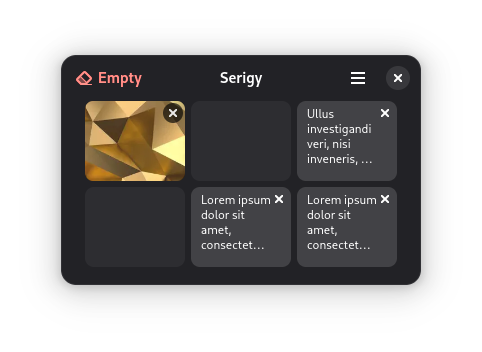

Observed history
| App | Change | Version | When ↑ |
|---|
No observed changes yet.
The initial import establishes a baseline. Future version changes will appear here.
Browse the app catalogue →Upstream releases
Release notes supplied by the developer. These dates are not Flathub package publication times.
2.3.03 Aug 2026
- New option to close the window after copying a slot, off by default.
- Fixed the window stealing focus every second when the clipboard was left by an application that had quit.
- Translation updates for Brazilian Portuguese and Spanish (Chile).
2.2.03 Aug 2026
- Search your clipboard from the GNOME overview and copy any slot, be it text, image or file.
- Clipboard monitoring is now optional, and incognito mode stores nothing at all.
- Copied files are kept as file references, so they paste as files instead of paths.
- Optional filtering of content marked as sensitive by password managers.
- Global shortcuts survive a portal restart and can be requested again when denied.
- Log files are now rotated, fixing crashes caused by unbounded log growth.
- Saved images moved out of the cache directory, where the system could delete them.
- Several fixes to clipboard capture reliability.
- Translation updates for Brazilian Portuguese and Spanish (Chile).
2.1.12 Apr 2026
- Fixed invalid markup in the application description.
- Pinned the libportal commit used by the Flatpak manifest.
- Removed duplicate obsolete entries from the translation files.
2.1.02 Apr 2026
- Improved Wayland clipboard detection using a sentinel-based activation flow.
- Redesigned welcome dialog following GNOME HIG.
- Window size is now persisted and restored across sessions.
- Added icon for email content type.
- Updated to GNOME runtime 50.
- Translation fixes and additions for Brazilian Portuguese, Spanish (Chile), and Russian.