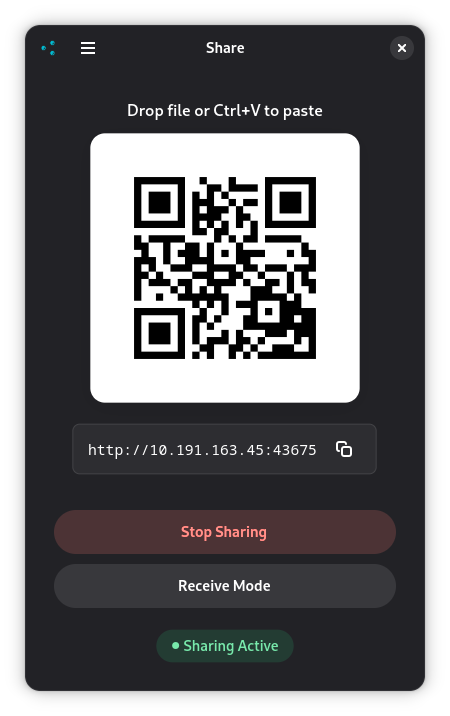
Share is a bidirectional file sharing application that works both ways — send files to others or receive files from them. It offers both a graphical interface (GTK) and a terminal-based CLI mode.
Features:
- Bidirectional file transfer - both send and receive files
- No additional software required - just a QR code scanner and web browser
- Receive Mode - let others upload files directly to your device
- Directory uploads - upload/download entire folder structures
- Multiple file uploads - batch upload many files at once
- Share data from the clipboard, automatically detect if the clipboard contains an image, or a text, note that pasting files will only send paths as text (if the app doesn't have read permission), so its better to drop them instead
- CLI mode — run entirely from the terminal without a graphical interface, useful over SSH or on headless systems
How it works:
- Creates a temporary HTTP server on your local network
- Generates QR codes for both sharing and receiving
- Sharing Mode: Others scan to download your files
- Receive Mode: Others scan to upload files to you via web interface
- All transfers happen locally over your network - no internet required
Perfect for quick file transfers between devices, mobile-to-desktop uploads, collaborative work, or any situation where you need wireless file transfer without cloud services.
Screenshots
Observed history
| App | Change | Version | When ↑ |
|---|---|---|---|
| updated | 2.4.0 | 6 Oct 2026 |
Upstream releases
Release notes supplied by the developer. These dates are not Flathub package publication times.
2.4.06 Oct 2026
- Use the same port every time (53318 by default) so it can be allowed through a firewall
- New Preferences window to change the port or go back to a random port
- Fall back to a random port when the chosen one is already in use
- New app icon
2.3.04 Aug 2026
- Better local ip detection, show more local interfaces
2.2.016 Jul 2026
- Handle multiple files sharing
- Better feedback when receving files
2.1.129 Jun 2026
- CLI mode — run entirely from the terminal with --cli flag, without requiring a graphical interface
- CLI supports file sharing, text sharing, receive mode, and clipboard paste
- QR code rendered in the terminal using Unicode block characters